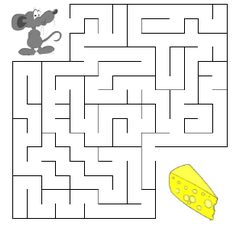
In this lab, you will implement a maze navigation game using object-oriented programming principles. The maze will be managed using several classes to represent rooms, room pairs (walls between rooms), and the maze itself. Your task is to implement the game mechanics, including maze setup, mouse navigation, and wall detection.
Objective: The goal is to guide a mouse from the start room (top-left corner) to the cheese (bottom-right corner) within a maze. The maze, mouse, and cheese are encapsulated in different classes: Room, RoomPair, and Maze. Your job is to implement these classes and use them to build and navigate the maze.
Classes: The main classes used in this assignment are:
Mouse: The mouse starts in the top-left room (coordinates: 1, 'a'). You can use the makeStartRoom() method from the Room class to set the mouse's starting location.
Cheese: The cheese is located in the bottom-right room (coordinates: 5, 'e'). The makeCheeseRoom() method will place the cheese.
Walls: Walls are placed between adjacent rooms. These walls are represented by the RoomPair class. You can create random walls by using the pick() method, which randomly selects adjacent rooms and creates a wall between them.
Wall Placement: The walls are placed using the Maze::build() method, which ensures that random walls are placed between adjacent rooms. Walls will be stored in an array of RoomPair objects inside the Maze class. There will be 8 internal walls in total, and their positions can be printed using the print() method.
During the game, the program will ask for the next move from the user. The user can move the mouse up, down, left, or right. If the move is blocked by a wall, the program will notify the user, and the mouse will remain in its current room. The game continues until the mouse reaches the cheese or the user chooses to quit.
The key classes and methods in the program are as follows:
The primary methods for building and navigating the maze include:
Cat: There is an additional feature you must implement: a Cat that roams the maze randomly. The cat will move between adjacent rooms every turn, possibly blocking the mouse's progress. The Cat class, like the mouse and cheese, will need to be implemented separately. The cat's movement will be random, and the game will end if the cat catches the mouse. Ensure the cat does not move into a wall. The cat always starts at a random location that is not where the mouse or cheese is.
In this part, you will focus on testing the individual classes and their methods. Create a project titled Lab9_Test, and implement the Room, RoomPair, and Maze classes in the provided maze.hpp file. Use initializer lists for constructors where appropriate. Test your implementation using the testMaze.cpp file, and uncomment sections incrementally as you complete each part of the implementation.
After completing the testing phase, create a project titled Lab9_Game. Use the same maze.hpp and maze.cpp (that you wrote) files from Part 1. Implement the full game loop in game.cpp, which will handle user input, mouse movement, and the win condition.
The game loop will follow this structure:
    1. Declare a Maze object.
    2. Call build() to generate the maze and place walls.
    3. Print the maze's wall positions.
    4. Start the game loop:
        a. Print the mouse's current room.
        b. Ask for the user's next move (up, down, left, right, or quit).
        c. Check if the move is blocked by a wall and move the mouse if possible.
        d. Repeat until the mouse reaches the cheese or the user quits.
At each turn, the cat will move randomly to an adjacent room, following similar movement rules as the mouse. If the cat moves into the same room as the mouse, the game ends.
By the end of this lab, you should have implemented and tested the Room and RoomPair classes. Submit your project files and verify your submission in the repository.